Bodil

An integrated wayfinding system that closes the gap betwen search and library navigation to reduce user confusion in a physic envionmet

✻ Wayfinding design

✻ Service design

✻ UX design

Scroll down for expanded case study

OVERVIEW

✻Scroll down for expanded case study✻

Challenge Context
Students often struggled to find what they needed when they had to apply catalogue information in the physical library space. The challenge for this project was to design a wayfinding concept that allows users to confidently navigate a multi-floor library.

Design Response
A connected wayfinding concept that better utilised digital and physical navigation guidance. It uses the same logic from search to navigation decisions in space, and reduces dependence on Dewey knowledge by translating it into spatial cues.

Design Impact
Lo-fi testing suggested that when catalogue guidance is mirrored by consistent cues in the space, navigation steps become easier to predict. That reduced wrong turns and backtracking, closing the gap between search and physical navigation.

Contribution
Team member in a 6-person academic project (Interaction Design course). My contributions included research synthesis, concept evaluation and concept direction, and prototyping.

Key takeaways
Multi-touchpoint navigation needs to be treated as one setup where spatial logic, information clarity, and real user behaviour are designed together.

Expanded

Where finding a book still broke down in the library space

Campus Norrköping Library already had a catalogue, a map function, and physical signage. Still, students often got stuck when they had to take catalogue information and turn it into a physical route through a multi-floor building. Search worked. The breakdown happened when catalogue information needed to become a route.

What user behaviour revealed about the real navigation problem

We started with a stakeholder meeting at the library to understand the context and constraints, then moved into user research. We ran semi-structured interviews with library visitors and used the material to map behaviour patterns instead of relying on assumptions. In synthesis, we compared participants across key behaviours and clustered overlaps into two personas:

- Anna, efficiency-driven and goal-oriented, arriving with a specific item in mind and little patience for friction.

- Gustav, more exploratory, using the library to browse and study without the same urgency.

Anna became our primary persona because her situation makes breakdowns costly. When she cannot confidently navigate, confidence drops quickly and people start guessing.

We translated the personas into scenarios and mapped the user journey. A clear pattern emerged: it was a mismatch between classification logic and how people navigate in space. Dewey ranges make sense as classification, but they are not automatically legible as spatial guidance. Floor transitions, "where am I?" orientation, and shelf interpretation were recurring friction points.

Why we chose spatial clarity instead of adding more technology

We ideated broadly, then clustered the concept space into three directions: AI, AR, and an information-structure approach. To choose a direction in a grounded way, we evaluated the concepts using structured comparison including Pugh charts, weighing feasibility, intuitiveness, inclusiveness, and fit with the library's real constraints.

The information-structure direction stood out because it did not try to replace the library's classification logic. AI and AR risked adding a layer on top of confusion and increasing dependence on a specific device or level of user comfort. Instead, the information-structure concept reduced dependence on Dewey knowledge by translating classification into cues users can follow, and by keeping the same logic consistent from catalogue to navigation.

A wayfinding system that connected search logic to movement in space

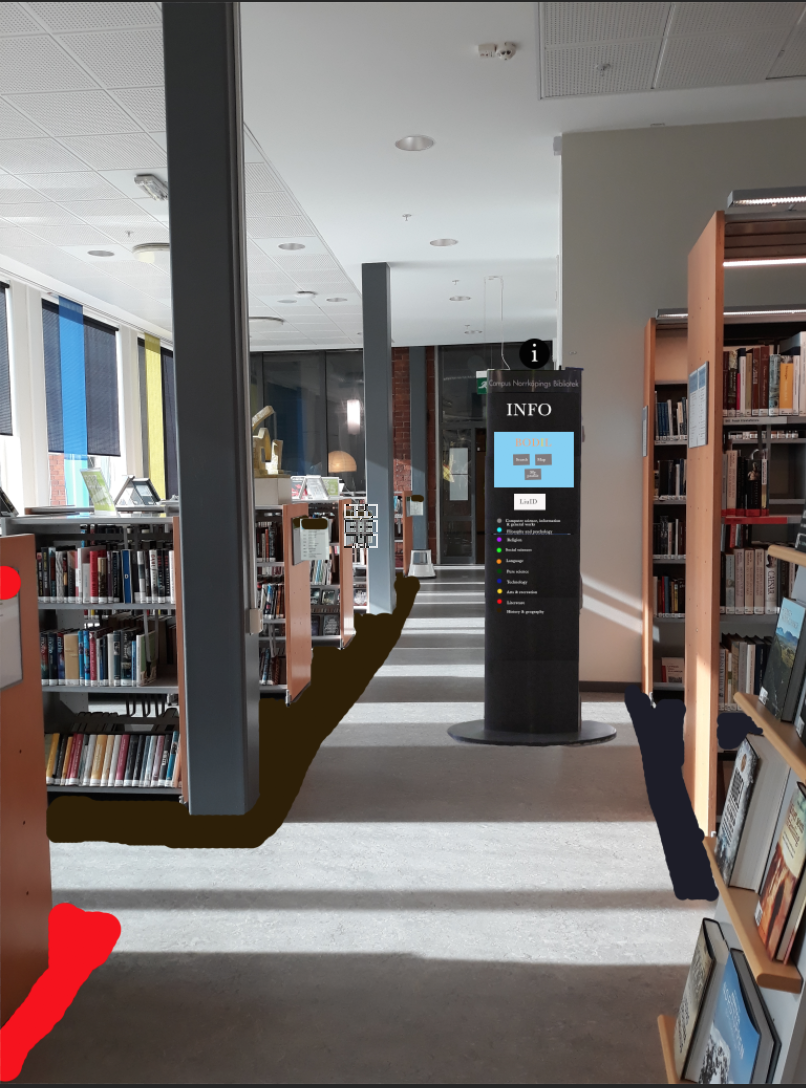
Bodil became a consistent setup across touchpoints where digital guidance and physical cues reinforce each other.

On the digital side, the core piece is an interactive 3D map designed to support orientation and shelf-level understanding. It helps users answer practical questions quickly: where am I, which floor do I need, and what does this number range correspond to in space?

On the physical side, the same structure is visible through a clear cue layer:

- Colour-coded zones linked to classification ranges, supported by symbols so the setup does not rely on colour alone.

- Directional cues in the environment, such as coloured arrows on the floor, placed where navigation decisions happen.

- Shelf signage improvements, such as clearer range labels and more legible signage from within aisles.


We also designed for availability in the moment of uncertainty. The concept includes screen kiosks placed around the library, so guidance is accessible mid-journey. We added a simple continuity layer called "My page" where users can save books and retrieve them later, using their LiU card to access saved lists without repeating the same search steps each visit

What testing showed when the same logic carried across touchpoints

We built a lo-fi prototype and tested it through task-based speak-aloud walkthroughs. The point of testing was to see whether the setup reduces hesitation, wrong turns, and repeated checking behaviour. The evaluation measured effectiveness through completion and error rate, and satisfaction using a standard questionnaire.

The results supported the direction: when the same logic is visible in the catalogue experience and confirmed in the physical environment, navigation steps become easier to predict and users spend less effort translating classification into spatial decisions.

What the project clarified about designing for wayfinding

This project made the value of treating wayfinding as one setup very concrete. If spatial logic, information clarity, and real user behaviour are not designed together, users have to translate too much between digital information and physical space, and they will get lost even if the catalogue information is correct. When the environment communicates its logic consistently, users stop guessing.

Say Hi! And get the conversation going!

Thanks for the message! I'll get back to you soon!
Oops! Something went wrong while submitting the form.